12. Synchronization and timecode
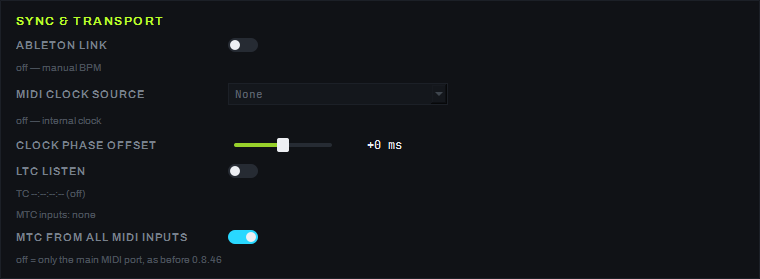
The SETTINGS screen, SYNC & TRANSPORT card — this is where the program aligns its own time with the environment: takes tempo or timecode from outside (Ableton Link, MIDI Clock, MTC, LTC), or sends its own timecode out through a separate generator. This card's settings do not depend on what is currently playing on the grid.
Internal tempo
The program has an internal tempo of 40–300 BPM with TAP and phase offset, but the BPM / TAP / QUANT cluster in the COMPOSITION screen's top bar is currently hidden — it is turned on with a single switch when it is needed. Quantized window launch is hidden along with it (a beat-division grid from 1/4 to 4, an armed window with a countdown to the start of the next beat).
External tempo
- ABLETON LINK — a toggle for joining a Link session on the local network: while no session is found, the tempo stays manual (status line "off — manual BPM"), once connected the tempo is taken from the session.
- MIDI CLOCK SOURCE — a dropdown list:
Noneor one of the open MIDI inputs; picking a device opens the port and switches the master clock to it (the status line under the list reads "off — internal clock" whileNoneis selected). Link and MIDI Clock exclude each other — the last source picked wins. - Clock phase offset — a fader from −500 to +500 ms in 10 ms steps (centered at
+0 ms): fine-tunes the beat grid (quantized launch, a tempo-locked LFO, the beat indicator) to the venue's sound.
Timecode in
- LTC LISTEN — a toggle for receiving LTC from the audio input (off by default: the audio input usually carries music, so listening for timecode in it is a deliberate operator choice).
- MTC timecode is picked up automatically while the signal is fresh (younger than 1 second), from any open MIDI input — not only the one selected in MIDI CLOCK SOURCE (0.8.46); if MTC and LTC arrive at the same time, MTC wins.
- How the position follows MTC (0.8.99). While the TC button on the bottom TIMELINE panel is on, the position
comes from the last timecode sample received (before, it was the median of five samples, and the position lagged by
about 0.16 s). For quarter-frame MTC 2 frames of transmission delay are added (a full message carries the exact
time, so it gets no addition). The position of a playing track is set softly while it is within 0.5 s of the
timecode: the video of the active block is not re-seeked on every timecode. A larger difference — a source jump, a
re-capture after a stop, a timecode started in the middle of the show — re-seeks the video at once, as an explicit
jump does. While the timecode runs, once a second a guard compares the player with the source second it should be on
and re-seeks it only when it is off by more than 0.12 s (the log shows a
timeline media RESYNC …line); without TC the guard is off, and past the end of the file (a block longer than its file) it does not re-seek. A sample more than 1 s from the prediction does not move the position at once but waits for the next sample to confirm it: a lone glitch is logged astimecode chase: MTC outlier held hh:mm:ss:ff, expected hh:mm:ss:ff, a confirmed jump astimecode chase: MTC jump hh:mm:ss:ff -> hh:mm:ss:ff (+N.N s); the counterstc_jumps,tc_outliersandlane_resyncsare in the session log's HEARTBEAT line. - TC: track windows (0.8.99). While TC is on and the timecode is fresh, a playing track with an address
("Set start TC…") lives in the window
[address, address + track length). If the timecode runs outside the window (with 0.5 s of margin on each side), the track stops the way the STOP button stops it, and the log saysTC window: '…' stopped — tc=… outside [a, b); inside the window its position follows the timecode from its address. For a group the window is the union of the windows of the members that have an address, and the master drives the position. A track without an address is left alone, and losing the timecode leaves free running, as before. A manual PLAY of an addressed track outside its window is stopped by the next fresh timecode; the address trigger does not start a track whose window has already passed, and a stop by the window does not re-arm the trigger. - Receiving MTC from all MIDI inputs is on by default; the MTC FROM ALL MIDI INPUTS toggle on this screen turns it off — then MTC is only picked up from the main MIDI input, as before 0.8.46 (turn it off if another program on the same computer needs the same MIDI interface: Windows only hands a MIDI input to one program at a time).
- If the same MTC stream arrives on two MIDI inputs at once, the program holds on to whichever port sent a full timecode frame first, for as long as frames keep coming from it; if that port's stream stops for more than 1 second, the program releases it and picks up the next port that delivers a full frame.
- The line under the LTC LISTEN toggle shows the decoded timecode
TC HH:MM:SS:FF, or(off)while nothing has been received; the "MTC inputs: …" line below it lists every MIDI input currently listening for MTC (orMTC inputs: noneif there are no open MIDI inputs).
MTC/LTC indicators in the deck
To the left of the layer strips on the COMPOSITION screen are two indicators — one for MTC and one for LTC.
Each has its own colored dot, an address HH:MM:SS:FF (or --:--:--:-- while there is no signal) and a
word status: NO SIGNAL — nothing is coming in; LISTEN OFF — for LTC, while the LTC LISTEN toggle is off;
LIVE — the signal is fresh, but the timeline is not following it yet; CHASE — the timeline is following
this source; STANDBY — the timeline is ready to follow, but another source is currently leading;
STALE — there was a signal and it has gone stale. The TC button in the bottom TIMELINE panel switches
which one is followed (in detail — page 09).
Timecode generator
The TIMECODE GENERATOR card is a separate timecode player with its own transport, independent of the show timeline: it can simply send timecode out on a schedule of scenarios, even if nothing is playing on the grid.

- A large timecode at the top of the card and a status line next to it (
STOPPED/PLAYING·MTC ON/OFF·LTC ON/OFF). - RATE — the timecode's frame rate: 24, 25, 29.97 DF or 30 fps. FREE-RUN START — the timecode the generator starts from. LOOP — loop the scenario playback.
- A five-button transport: PREV / PLAY / PAUSE / STOP / NEXT (PREV and NEXT move between scenarios).
- ENABLE MTC sends MIDI Time Code to the chosen MIDI output; ENABLE LTC sends LTC to the chosen audio output with a choice of channel (LEFT / RIGHT / BOTH) and a level from −40 to −3 dBFS. Both are off by default; a note under them reminds that LTC is an ordinary audio signal and is best routed to a separate interface channel rather than mixed with the clips' sound.
- EVENT SCENARIOS — a segment table (columns PLAY / ON / NAME / START TC / DURATION), the + SEGMENT / − SEGMENT buttons add and remove a row, the arrows reorder them; the empty table shows the hint "No segments — press + SEGMENT to program the first cue."
How to turn it on
- To make the program's tempo follow an external source — turn on ABLETON LINK with the toggle, or pick a device in MIDI CLOCK SOURCE; picking one automatically turns off the other.
- To make the program follow incoming timecode — for MTC nothing needs to be done (it is picked up automatically once the signal is fresh, from any open MIDI input, not only the one selected in MIDI CLOCK SOURCE), for LTC turn on the LTC LISTEN toggle, and have the timeline follow it with the TC button in the bottom TIMELINE panel.
- To make the program send timecode out by itself — set RATE and FREE-RUN START in the TIMECODE GENERATOR, add segments with the + SEGMENT button, turn on ENABLE MTC and/or ENABLE LTC with the output you need, and press PLAY.
Parameters
| Parameter | Values |
|---|---|
| Internal tempo | 40–300 BPM (the BPM/TAP/QUANT cluster in the top bar is hidden) |
| Clock phase offset | −500…+500 ms, 10 ms step, default +0 ms |
| MIDI Clock | 24 PPQN, median jitter filter |
| MTC pickup | automatic with a signal fresher than 1 s |
| TIMECODE GENERATOR, RATE | 24 / 25 / 29.97 DF / 30 fps |
| TIMECODE GENERATOR, LTC level | −40 to −3 dBFS |
Limitations
- Testing Ableton Link against a real Ableton Live has not been done — only a session inside the local network.
- The BPM / TAP / QUANT cluster in the top bar and quantized window launch are hidden by the client's decision.