08. Effects
An effect is processing added on top of a window's picture: color correction, blur, distortion and the like. Effects are gathered into a chain — up to 64 in a row, each with its own MIX (the share of original vs. processed frame) and bypass; parameters change live during a show.
Where effects live
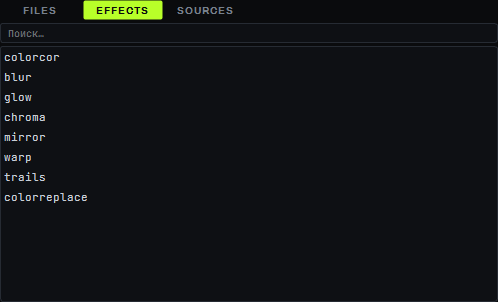
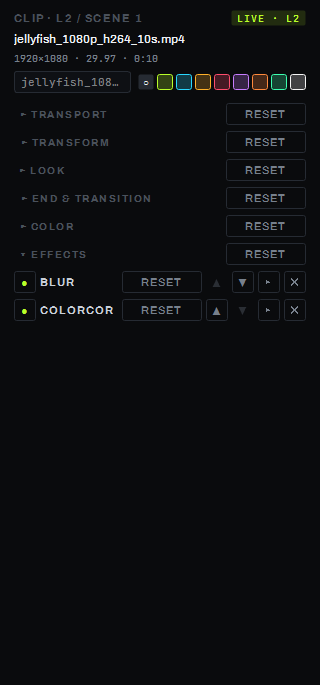
The list of built-in effects is on the media browser's EFFECTS tab (at the bottom of the screen, next to FILES and SOURCES). The selected window's chain is shown on two synchronized panels: the EFFECTS group in the clip panel on the right (details — on page 07b) and the FX CHAIN ribbon at the bottom of the screen, with its own + ADD button.
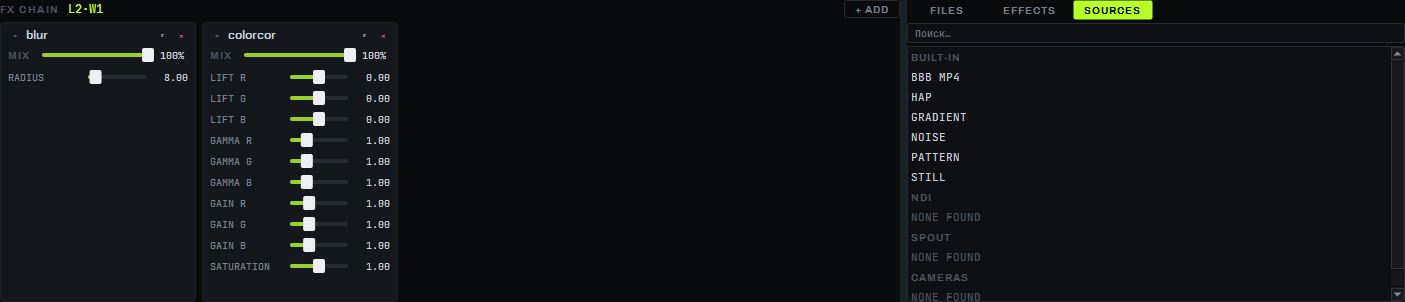
The window chain is one of three possible insertion points for effects (window / layer without a window / the whole composition as a master chain); but for now only window chains can be edited from the interface — through the clip panel and the FX CHAIN ribbon. A layer without a window and the whole composition also have their own chains, but there is no screen yet to edit them.
Adding an effect
- Select a grid window (it also becomes the FX CHAIN ribbon's target).
- Drag the row you need from the browser's EFFECTS tab onto this window's clip panel — the effect becomes the last card in the chain, the EFFECTS group expands itself, and the FX CHAIN ribbon switches to this window.
- The + ADD button on the FX CHAIN ribbon does the same — it opens a list of built-in effects and a USER GLSL… item for a custom shader.
A custom GLSL effect cannot be added by dragging — only through + ADD → USER GLSL…, and only onto an already-started (live) window.
Effect card
Each effect in the chain is its own card, identical in the clip panel and on the FX CHAIN ribbon:
- a bypass indicator in the header;
- the effect's name;
- a RESET button — this effect's parameters to defaults, MIX → 100 %, bypass cleared;
- ▲ / ▼ arrows — reorder the effect in the chain;
- ▾ / ▸ — collapse or expand the card body (a new card expands itself, the rest collapse);
- ✕ — remove the effect from the chain.
In the expanded body — a MIX row (0…100 %, default 100 %) and a row per parameter: a fader with a field and a unit (the label and unit are the same across all cards — "RADIUS px", "ANGLE °" and so on) or a dropdown for parameters with enumerable values (for example, MIRROR's MODE — X / Y / QUAD / 6-SEGMENT). The RESET button on the EFFECTS group's own header is special: it does not return parameters to defaults, it clears the entire chain; an empty chain shows the hint "drop an effect here". Reordering an effect on a live window rebuilds its chain from scratch.
Built-in effects
| Effect | Purpose | Key parameters |
|---|---|---|
| COLORCOR | Per-channel color correction: shadow lift, gamma and highlight gain, overall saturation | LIFT R/G/B, GAMMA R/G/B, GAIN R/G/B, SATURATION × |
| BLUR | Blurs the frame | RADIUS px |
| GLOW | Glow/bloom — blows out bright areas with spread | THRESHOLD, INTENSITY ×, RADIUS px |
| CHROMA | Chromatic aberration — a colored fringe from the center | AMOUNT %, CENTER X %, CENTER Y % |
| MIRROR | Mirror / kaleidoscope | MODE (X / Y / QUAD / 6-SEGMENT), CENTER X %, CENTER Y %, ANGLE ° |
| WARP | Distorts the frame with a wave | AMPLITUDE px, FREQUENCY, SPEED × |
| TRAILS | Trail — overlays frame history (feedback/echo) | DECAY %, MODE (MIX / MAX) |
| COLORREPLACE | Replaces a color by hue (HSV): FROM → TO; brightness is preserved, grey and near-grey areas untouched (the same effect as the clip panel's COLOR group REPLACE block) | FROM, TO, TOLERANCE, SOFTNESS, AMOUNT |
Neighboring effects in the chain are automatically merged into a single pass (cached on disk) — eight effects at 4K cost about 0.33 ms per frame on the reference GPU. The chain keeps the RADIUS/THRESHOLD/DECAY values of BLUR, GLOW and TRAILS across composition resolution and texture bit depth changes (SETTINGS → Texture bit depth); an effect added on an already 16-bit pipeline renders in the same format as the rest of the chain.
Custom GLSL and plugins
USER GLSL (+ ADD → USER GLSL…) — a fragment shader with its own file, up to 4 parameters,
described right in the shader with a // @param id min max default line. The shader runs in a sandbox: a
64 KB limit, no preprocessor or infinite loops, compilation with a 10 s timeout. The ⟳ button reloads
the file from disk, keeping the current parameter values. An error in the shader does not stop the
program.
Plugins — a proprietary format (DLL), up to 8 passes per plugin, a shared parameter budget with the rest of the chain; sample plugins ship for developers. OpenFX and FFGL formats are not supported — they are incompatible with the current graphics pipeline without extra frame copies.
Parameters
| Parameter | Values |
|---|---|
| Effects in a chain | up to 64 |
| Passes in a chain | up to 128 — beyond that, + ADD refuses the effect, the rest of the chain is unchanged |
| Card MIX | 0…100 %, default 100 % |
| Chain insertion points | window, layer (without a window), composition (master) |
Limitations
- Only window chains are editable from the interface (clip panel and FX CHAIN ribbon); the chain of a layer without a window and the composition's master chain have no screen of their own yet.
- A custom GLSL effect can only be added through + ADD → USER GLSL… on an already-started window — it cannot be added by dragging.
- OpenFX and FFGL plugin formats are not supported.