07b. Clip panel: END & TRANSITION, COLOR, EFFECTS
A continuation of the clip panel — the three remaining settings groups of the selected grid window: what to do when the clip ends, color, and this window's effect chain.
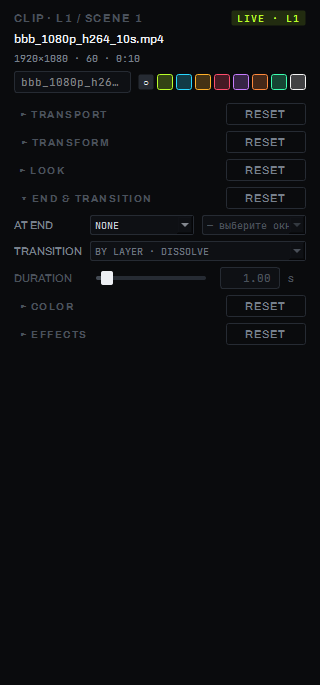
END & TRANSITION
AT END — what happens when a clip plays to the end:
- NONE — nothing, behavior depends on MODE (LOOP/PING-PONG keep playing the clip, ONCE holds the last frame, ONCE+CLEAR mutes the layer);
- NEXT / PREVIOUS — move to the neighboring window on the layer (autopilot through windows);
- RANDOM — move to a random window on the layer;
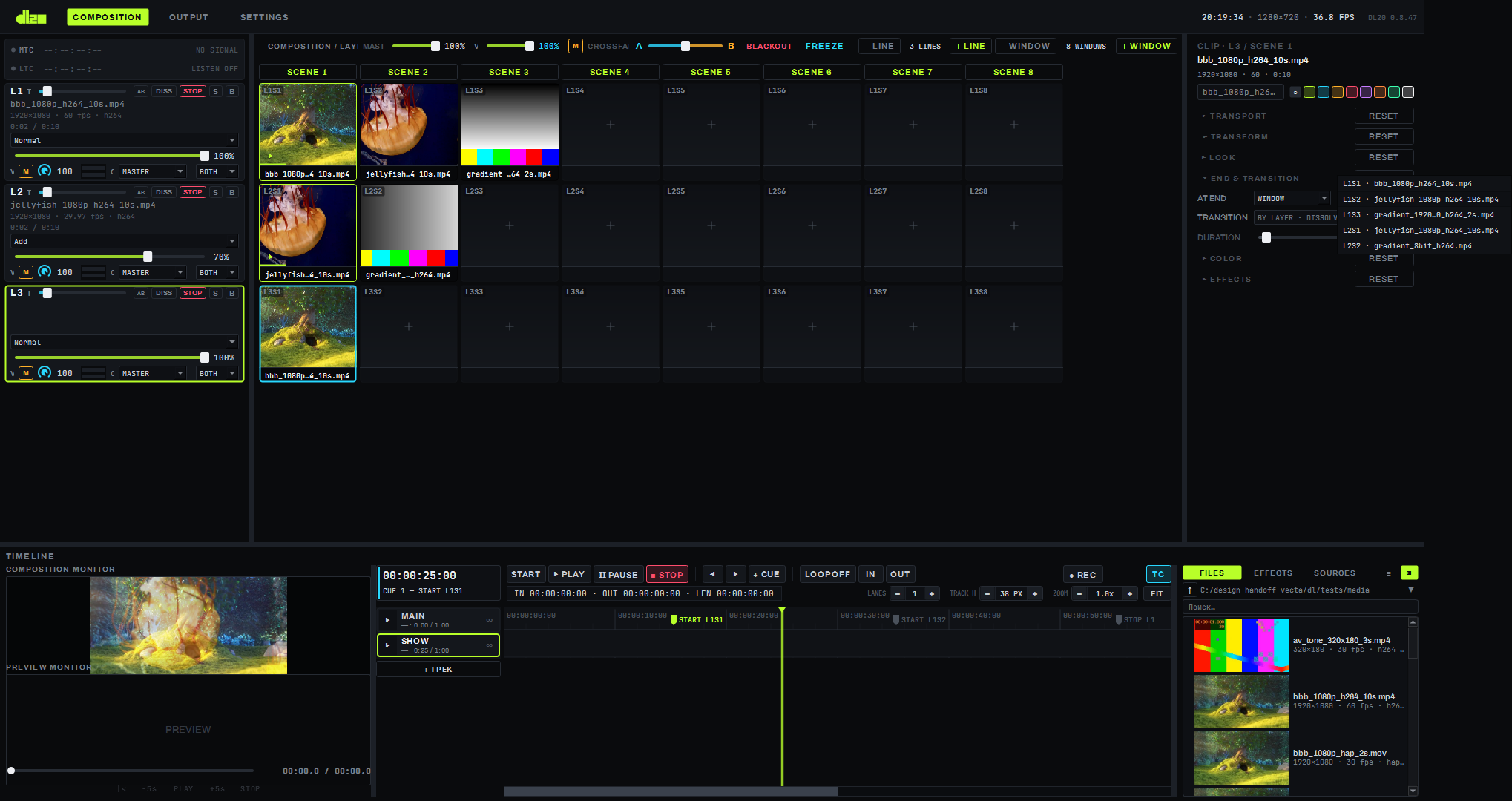
- WINDOW — move to a specific grid cell, on this layer or another; the target is chosen from a dropdown list (since 0.8.40) that is active only when AT END = WINDOW.
The target list lists all occupied windows of all visible layers in order, layer → column (except the
cell itself), as a L<n>S<m> · <file name> row; with no target chosen, the first row is a placeholder
"— choose a window —". If the saved target is no longer occupied (the window became empty, the layer was
hidden, or it is the cell itself), it remains the first row with a "L
TRANSITION — the transition the window will use to change the layer's content at the end of the clip or for a WINDOW target: "BY LAYER" (takes the transition and time from the layer strip) or its own — the same list of 16 as on the layer strip (for TO COLOR, the layer's color is used). DURATION — 0–10 s; the field is greyed out while TRANSITION = BY LAYER or STINGER (these transitions do not use a duration).
COLOR
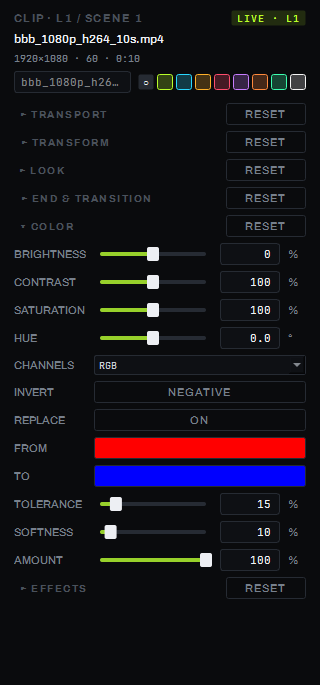
Common fields (collapse into a single color matrix — at default values the frame is unchanged byte for byte):
| Parameter | Range |
|---|---|
| BRIGHTNESS | −100…100 % |
| CONTRAST | 0…200 % |
| SATURATION | 0…200 % |
| HUE | −180…180° |
| CHANNELS | RGB / RBG / GRB / GBR / BRG / BGR |
| INVERT | the NEGATIVE button — negative |
REPLACE — replaces one color with another by hue (HSV): an on/off button, FROM (which color to replace) and TO (with what) swatches, TOLERANCE and SOFTNESS — the width and softness of hue matching, AMOUNT — replacement strength; brightness is preserved during replacement, grey and near-grey areas are left untouched. While REPLACE is off, this step is skipped entirely.
Gamma and curves are not part of this group — they are done as a separate window effect (the EFFECTS group, below).
EFFECTS
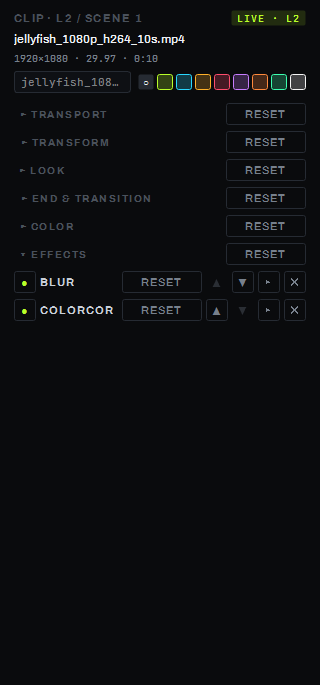
This window's effect chain. Drag a built-in effect from the media browser's EFFECTS tab onto the clip panel of the selected window (dropping inside the panel's own fields does not accept it) — the effect becomes the last card in the chain, the EFFECTS group expands itself, and the FX CHAIN ribbon at the bottom of the screen switches to this window.
Each effect card carries: a bypass indicator in the header, the effect's name, its own RESET button (the effect's parameters → defaults, MIX → 100 %, bypass cleared), ▲/▼ arrows — reorder the effect in the chain, ▾/▸ — collapse/expand the card body (a new card expands itself, the rest collapse), ✕ — remove the effect. In the expanded body — a MIX row (0…100 %, the share of original vs. processed frame) and a row per parameter: a fader with a field (right click on the fader — default) or a dropdown for parameters with enumerable values.
The group header's RESET differs from the rest: it does not return parameters to defaults, it clears the entire chain; an empty chain shows the hint "drop an effect here". Reordering an effect on a live window rebuilds the chain on the layer from scratch. Details on the effects themselves and their parameters are on page 08.
Parameters
| Group | Parameter | Values |
|---|---|---|
| END & TRANSITION | AT END | NONE / NEXT / PREVIOUS / RANDOM / WINDOW L<n>S<m> |
| END & TRANSITION | TRANSITION | BY LAYER (transition and time from the layer strip) or its own — the same 16 transitions as the strip |
| END & TRANSITION | DURATION | 0–10 s |
| COLOR | BRIGHTNESS | −100…100 % |
| COLOR | CONTRAST | 0…200 % |
| COLOR | SATURATION | 0…200 % |
| COLOR | HUE | −180…180° |
| COLOR | CHANNELS | RGB / RBG / GRB / GBR / BRG / BGR |
| COLOR | INVERT | off / on |
| EFFECTS | Card MIX | 0…100 %, default 100 % |
Limitations
- The COLOR section: the layer's "as is" route does not carry the window's color or REPLACE — nor its opacity; during a transition the outgoing clip picks up the new window's color but loses its own color replacement; areas brighter than 1.0 are clipped after COLOR; REPLACE matches only by hue, not exact RGB; there is no built-in eyedropper to pick a color from the composition.
- Layer effect chains without a window and the master chain are not edited from the clip panel. A custom GLSL effect cannot be added by dragging onto the panel — only through ADD → USER GLSL… in the effects ribbon, on an already-started window.