11. DMX LUMIVERSE and VOLUMETRIC output
Beyond projectors and displays (page 10a), the OUTPUT screen can drive LED fixtures over lighting-control protocols and assemble a real LED volume from the composition's layers. Both types are their own Screen devices in the same SCREENS/SLICES list, with their own card and their own set of canvas tabs.
DMX LUMIVERSE
A screen of type DMX LUMIVERSE turns the composition into control of LED fixtures over wire: bars (a row of N×1 pixels) and 2D matrices W×H, addressed into Art-Net 4 or sACN (E1.31) universes.
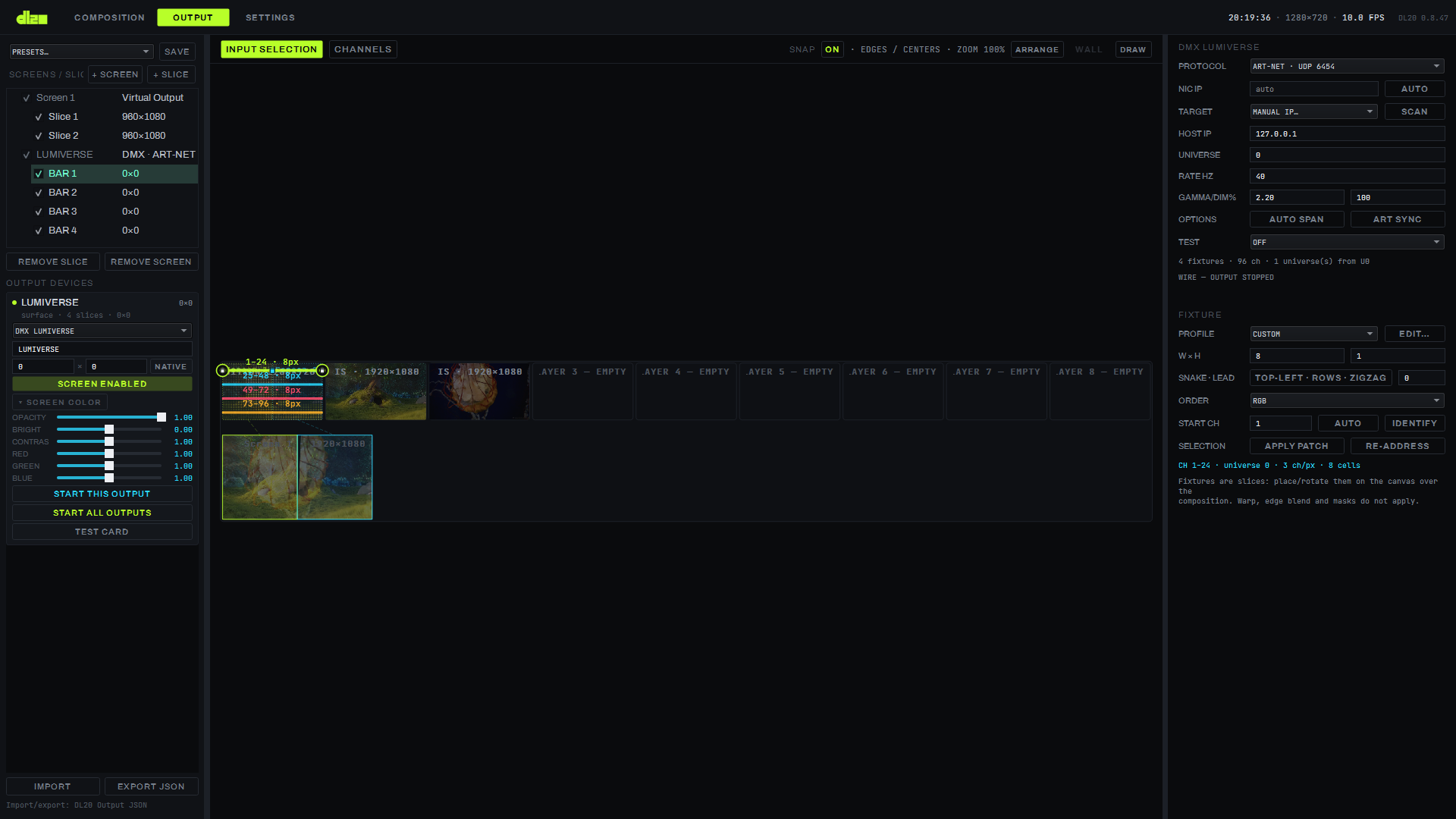
Fixtures and layout
The fixture profile library is stored on the machine; a non-modal FIXTURE EDITOR (the EDIT… button next to the PROFILE field) edits a profile with a live traversal preview. A fixture sits on the composition the same way a monitor slice does — through a sampling N×1 render path with its own corrections and gamma. A bar is a row of N×1 pixels, a 2D matrix is a W×H grid with one of sixteen snake-traversal orders; a fixture has leading channels and its own color order (RGB / GBR / …). A fixture is moved on the channel map with the mouse (a new start channel; Shift — without crossing its own universe boundary), with the arrow keys by ±1 channel (Shift — by the fixture's width), Delete removes it, Ctrl+D duplicates it with an edge-to-edge offset; a right click gives IDENTIFY (a 1 Hz blink right on the wire), a double click opens the profile's EDIT….
Protocols and addressing
PROTOCOL — Art-Net 4 or sACN (E1.31), up to 768 universes, a single wire refresh rate (RATE HZ) is set for the whole project; AUTO SPAN lays fixtures out across universes by itself when addressing.
Channel map
The CHANNELS tab is a map of all of the Lumiverse's channels: a 32×16 cell grid per universe (512 channels, the header shows occupancy as "96/512"), the first channel number of each row on the left (1, 33, 65 … 481) does not depend on the cell width. A cell's color is the fixture pixel's actual color (RGB or RGBW through its own color order, with no separate addressing arithmetic — only through the wire), fixture overlaps are highlighted in red; the NUM / % / BAR switch changes how the value is shown in a cell, HOLD freezes the picture (the wire keeps going meanwhile), a cell's live byte value updates no more often than 20 Hz. An inspector below the grid shows the universe, channel, fixture, pixel, channel function and value under the cursor.
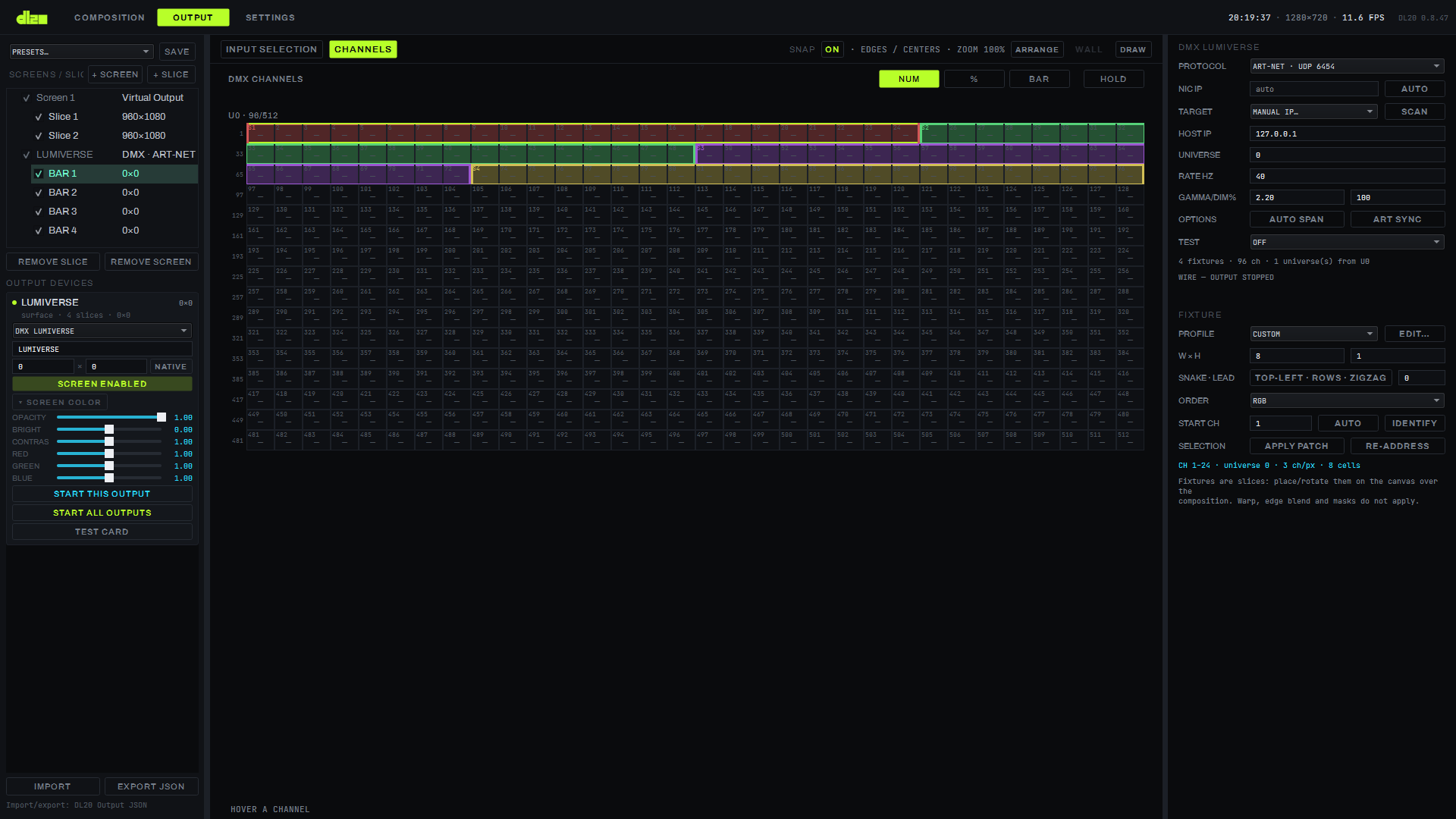
On a DMX screen's canvas only the INPUT SELECTION and CHANNELS tabs are available — OUTPUT
TRANSFORMATION does not apply to fixtures, nor do warp, blend and masks. In the SCREENS/SLICES tree a
fixture shows an address instead of a size — "first–last · U
Test patterns
TEST — WHITE (checking power and addressing), RGB CYCLE and CHASE (a running check across fixtures), plus IDENTIFY for a single fixture — all of these are live-only, not recorded into the project, STOP clears them immediately.
Performance
Measured on an emulated rig of 2000 Clenled 270 px fixtures (128,000 cells, 384,000 channels, 750 universes): 1.06 ms per render frame, 138 Mbit/s of Art-Net traffic, a four-fold margin at the sender, 39.7 Hz on the wire against a target of 40.
VOLUMETRIC
A screen of type VOLUMETRIC assembles a volume from the composition's Z-layers and sends it as a set of Art-Net or sACN universes — for a real LED volume (a cube, an installation built from cabinets) instead of a flat screen. Since 0.8.97 the VOLUMETRIC panel is a simple card for a Clen P83 box: pick the fixture, the number of boxes, the IPs and press START.
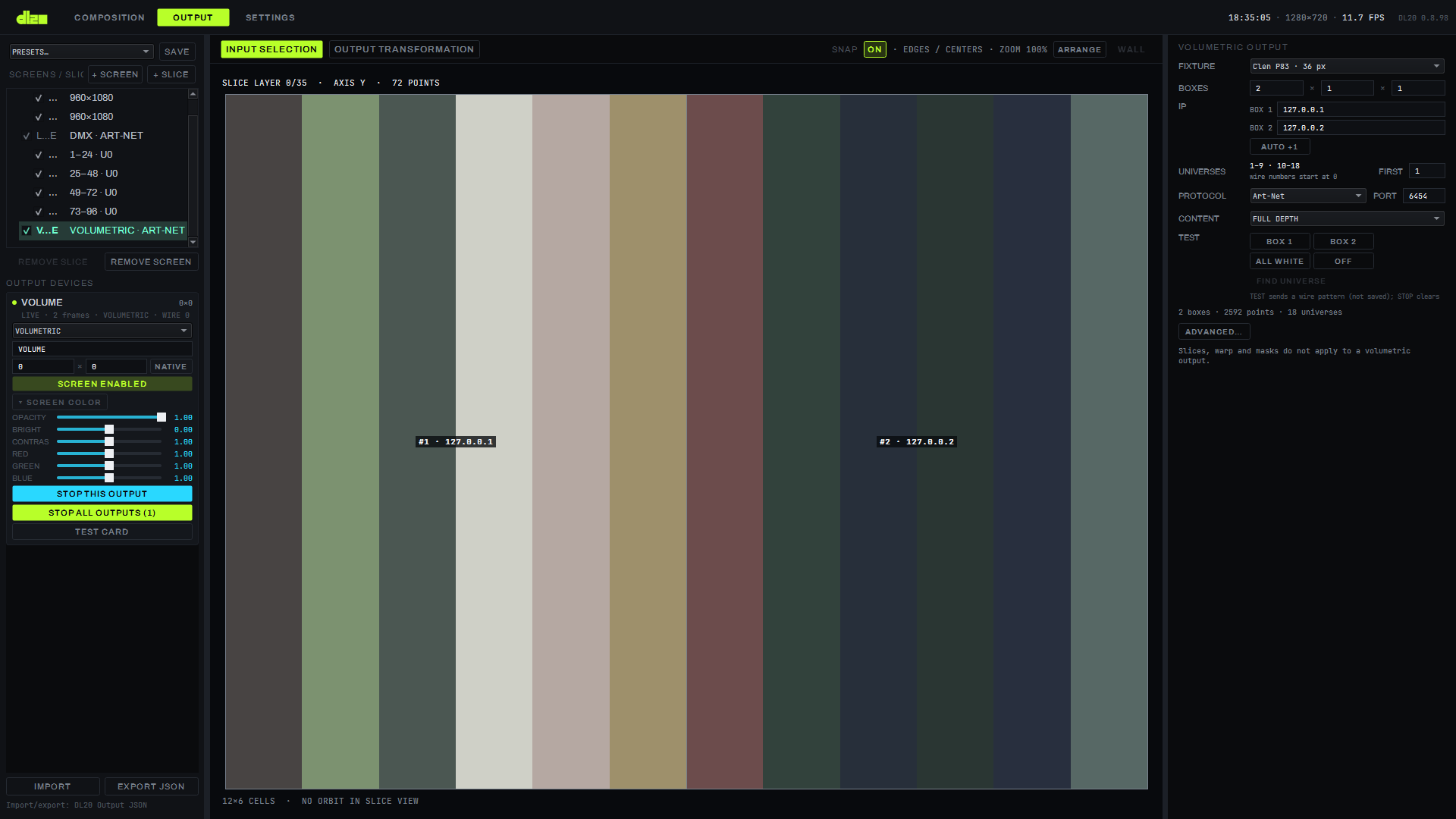
The P83 card (0.8.97)
The cause was the customer's own words: "I tried version 0.8.95, it is not clear at all how to work with volumetrics, everything is very complicated, the setup needs simplifying, right now I have 2 cabinets available" (in Russian in the original request). So the VOLUMETRIC panel is now a single card instead of a set of cube fields and a wizard. Edits in the card apply at once; there is no CREATE button.
- FIXTURE — the fixture: Clen P83 · 36 px or Clen P83 · 72 px. The fixture defines the whole cabinet: 6×6 strings, 2×2 boards, start corner, pitch, 144 pixels per universe. The CUSTOM item (greyed out, not selectable) only shows that the screen holds a wizard installation which the card cannot lay out; its BOXES and IP are read-only, and it is edited under ADVANCED → NEW VOLUME.
- BOXES
X × Z × Y— how many boxes in a row, in depth and in floors. Boxes fill the grid along X, then Z, then Y. - IP — the address of each box. An empty field means the rule "first address + box number"; the AUTO +1 button puts that rule back into all fields. At most 64 fields are shown (beyond that, the line "+ N MORE BOXES NOT LISTED"; the other boxes follow the rule or keep their earlier addresses).
- UNIVERSES — display only: each box takes consecutive universes (at 36 pixels that is 9 universes per box: "1–9 · 10–18"); FIRST is the first universe literally on the wire.
- PROTOCOL / PORT — Art-Net (6454) or sACN (5568). sACN on port 6454 takes 5568 itself, Art-Net on 5568 takes 6454; an operator's own port is left alone by the card.
- CONTENT — FULL DEPTH (the default: the composition's flat layer is replicated over the whole depth of the installation, no layer count to work out by hand; a P83 36 px box is a 6 × 36 × 6 cell grid — depth Z = 6 layers, the strings run along Y; two boxes in a row — 12 × 36 × 6), ONE LAYER (one layer on the Z PLANE plane), DEPTH MAP (a layer plus a depth map). QUILT mode is under ADVANCED — the combo shows it as a greyed-out line.
- TEST — wire test patterns: BOX n blinks the whole box at 1 Hz (the other boxes dark), ALL WHITE lights every point, OFF clears. At most one button is pressed. The pattern is operational — it is not saved in the project, STOP and a change of screen type clear it; this way "wrong box" is caught without editing the project. At most 64 BOX buttons; ALL WHITE covers all boxes. A button's number matches the "#n" on the slice. If the pressed button's box is gone (fewer BOXES, the wizard's CREATE, Undo), the pattern clears itself. The second line of the row holds FIND UNIVERSE (since 0.8.98; subsection below).
- STATUS — "N boxes · P points · U universes"; a patch error (for example overlapping channels) is red; the HOST_NOT_ON_NIC warning is a second line, in amber (it does not block START), and only here: ADVANCED does not repeat it. The output status line (LIVE · WIRE …) is on the device card on the left.
A fresh screen. A new VOLUMETRIC screen is 1 P83 box on 2.0.0.11 with content over the full depth.
Before, START on the defaults sent a 32×16×8 cube to 127.0.0.1 (that is how it looked in the customer's
laptop feedback on 0.8.95). The default is created only if the installation is empty and the classic cube
has its structure defaults; a screen that already has a configured cube is not changed when the type is
switched.
The slice. On the INPUT SELECTION tab the layer slice draws a frame around each box and the label "#n · IP" at its centre; if the frame is narrower than 48 px, only "#n". The slice is painted with the same buffer that went to the wire, including under a test pattern.
Honestly. The P83 profile defaults come from the manufacturer's document; the board order has not been checked on a real box (if the picture is scrambled, use ADVANCED → NEW VOLUME → BOARD ORDER); the patch data for the customer's two boxes (the boxes are patched by MAD-SHOW, the IPs are known) has not been received yet, so the card was verified by probes on loopback, not on two real boxes. Modules and auto-patch by IP are a separate stage (V1) after a field check of the card.
FIND UNIVERSE: finding a box's first universe (0.8.98)
The cause was the customer's 2026-10-13 report from the laptop (0.8.97, the first session with a real box). The
log has START DMX 0 Art-Net -> 2.0.0.112 universe 0 (1 fixtures) from 2.0.0.2 [NIC pinned] and
START VOLUMETRIC 0 6x36x6 flat -> installation art-net port 6454, 1296 points to 1 receivers on 9 universes,
then seven ALL WHITE / OFF pairs and no WIRE or dropped line. Whether the box lit up cannot be seen from the log.
The hypothesis: the card counts universes from FIRST 1, while the box that MAD-SHOW shows as "1–9" listens on
wire Art-Net 0–8; it is not proven — the release gives a tool that will show it, and a log where it shows.
The TEST row now has two lines; the second holds FIND UNIVERSE:
- Enter the box IP in the card and stop the output (STOP THIS OUTPUT): with a live output the button is disabled, its tooltip reads "STOP the output to scan".
- Press FIND UNIVERSE. The program sends a white packet (510 channels of 255) straight to universe n at
the IP of box 1 of the card — bypassing the patch, so universe 0, which the patch lacks at FIRST 1, is
reachable. The number n grows once a second from 0 to 31 and wraps (sACN: 1 to 32 — it has no universe 0).
Leaving a universe, the program darkens it with a black packet (all channels 0): one universe is lit at a
time, so a part of the box flashes for a second and goes dark. The card shows SCANNING UNIVERSE n, the
session log shows
SCAN UNIVERSE n. - When the box flashes, press STOP SCAN (or FIND UNIVERSE again). The scan goes to HOLD: the current n stays lit white, the line reads HOLDING UNIVERSE n — ◀ ▶ to find the box, then SET FIRST, and the buttons ◀, ▶ and SET FIRST = n appear under FIND UNIVERSE. While you reached for the button the number may have moved on: use ◀ ▶ (n−1 / n+1, wrapping; the old number goes dark, the new one lights white) until the box is lit on the number shown. Counting from 0, that is the box's first universe.
- Press SET FIRST = n — the FIRST field takes the held n (as with a manual entry), the universe goes dark and HOLD ends. Then START, ALL WHITE.
HOLD ends with a second press of FIND UNIVERSE or with OFF; any TEST button, START of the output, changing the screen, editing the card and quitting the program stop the scan or HOLD as well — each time a black packet goes to the current universe, so the box does not stay white. SET FIRST = n is shown only during HOLD — after STOP SCAN or a second press of FIND UNIVERSE. The scan is an operational control: it is not saved in the project. With more than one box, only box 1 is scanned — packets go to its IP only: SET FIRST = n sets FIRST for the whole installation, so box 1's first universe becomes n.
Known. If the box did not flash on any of universes 0–31, check the box IP (2.0.0.112 in the report) and the
laptop's subnet (2.0.0.2 in the report); a red SCANNING line ("SEND FAILED …") names the network error code.
The black packet and HOLD have been checked on a test receiver, not on a real box.
The hint under UNIVERSES. A grey line "wire numbers start at 0"; its tooltip explains: Art-Net wire numbers start at 0, MAD-SHOW shows 1–9 for wire 0–8; if the box stays dark, try FIRST 0 or FIND UNIVERSE.
What the log shows. The volume START line names the receivers and the range of universes:
… 1296 points to 1 receivers (2.0.0.112) on 9 universes (U0–8), and HEARTBEAT carries vol_sent and
vol_dropped (packets and drops of the volume wire). A report sent from SEND FEEDBACK now contains them.
The engine's "one universe" pattern (VOLUMETRIC n TEST UNIVERSE u in the log) lights only the patch points of
that universe; to find a universe outside the patch use FIND UNIVERSE.
ADVANCED: the NEW VOLUME wizard and the classic cube
The ADVANCED… button at the bottom of the card reveals the earlier controls: the NEW VOLUME wizard, the CLASSIC CUBE button (the "plain cuboid without an installation" state), the VOLUME W×H×D fields, SLICE LAYER, MODE, THICKNESS, TRANSPORT, HOST / PORT / UNIVERSE and QUILT GRID. Whether it is expanded is remembered between runs. Old projects load and save as before: a wizard installation (including two P83 boxes since 0.8.95) stays an installation — the card shows it if it can be laid out, otherwise as CUSTOM; a classic cube stays a cube (CLASSIC CUBE pressed, the installation rows hidden). A click on CLASSIC CUBE removes the installation and any test pattern; a second click brings back this screen's previous installation as it was, a wizard CUSTOM one included (remembered for the session, not saved in the project).
A volume is built in one of three modes: FLAT (a flat slice by Z), DEPTH-MAPPED (a 2D layer plus a depth map) or QUILT (a grid of several layer tiles). The canvas preview is a live voxel cube, driven by the mouse (orbit, zoom); in FLAT mode the ZPLANE slider picks a single slice by Z, and the preview shows that slice instead of the whole cube.
Cabinets, strings and the NEW VOLUME wizard
The wizard is under ADVANCED…. For a real rig — not a single flat cuboid but an installation of physical cabinets with their own pixel strings — there is a dedicated wizard, the NEW VOLUME button. It builds the installation from the same parameters as the actual wiring: how many pixels per string and the spacing between them, how many strings per cabinet on each side, which corner the wire starts from and in which order, how many cabinets along each axis and the gap between them; addressing — how many pixels per universe, which universe and which host to start sending from, the protocol (Art-Net or sACN) and the port.
The installation goes on the wire (0.8.95). The installation from the wizard is sent to the network by the cabinets' IP addresses: 144 pixels per universe, a string is never split. To be honest: from 0.7.0 to 0.8.94, with a non-empty installation, the classic cube from the W/H/D fields went out on one IP — the installation was stored, validated and drawn on the slice, but not sent; this was a defect, closed in 0.8.95. Now the W/H/D fields (under ADVANCED…) show the cell grid and are disabled when an installation is present; the slice is coloured from the same buffer that went on the wire. If the patch is invalid (for example, two cabinets share channels), START is refused and not a single packet is sent; an edit that makes the patch invalid on a live output stops the output. The HOST_NOT_ON_NIC warning does not block sending: none of the local adapters is on the receivers' network (it stays silent when no local networks are visible). Protocol, port and priority come from the wizard's addressing; sACN on port 6454 (the Art-Net default) goes out on 5568, as with the classic cube. The classic cube's HOST, PORT and UNIVERSE fields are disabled while an installation is present: the NEW VOLUME wizard sets the addressing. With every cabinet disabled, START is refused with «all cabinets are disabled — enable at least one».
The P83 preset and boards. The wizard has a P83 PRESET (6×6 strings, 36 pixels, 83 mm pitch, 2×2 boards, board order "2 1 3 4", start TOP-RIGHT, snake off, 144 pixels per universe, first address 2.0.0.11, Art-Net 6454) and the BOARDS A×B and BOARD ORDER fields (board numbers separated by spaces or commas, from 1). The board order follows the manufacturer's document and has not been checked on the box itself — if the picture is scrambled, change the order in BOARD ORDER. A board count that does not match the order is the BOARDS_MISMATCH error.
The live volumetric status line (0.8.96). On the OUTPUT screen, a running volumetric output's caption reads
LIVE · N frames · VOLUMETRIC · WIRE S sent · D dropped. WIRE is what the sender's counters show: S frames
went to the network, D were lost. If sending failed, the first error code with the address is appended:
· sendto 240.0.0.1:6454: WSAENETUNREACH (10051) (in the warning colour); the same message goes to the session
log at the first drop, then at most once per ~120 frames. If D grows and there is no code, frames are being
lost to the sender's full queue, not to a network refusal. A FILE output has no WIRE part. What the codes mean —
page 16. On a narrow panel the line is cut off — the full text with the code is shown in its tooltip. After STOP
or a live edit of the address, the WIRE counters and the code start over, and the line names the new address.
Volumetric sending now works like DMX: the socket is blocking and a worker thread performs sendto (the old
non-blocking socket could lose frames — the same lesson as the DMX sender's); to be honest, the cause of the
"0 delivered" report on 127.0.0.1 from the customer's laptop could not be reproduced, so release 0.8.96 first of
all names the error code.
Addressing and a known limitation
sACN counts universes from 1 on the path through the NEW VOLUME wizard: the FIRST UNIVERSE field does not accept 0 when sACN is selected — the value is pulled up to 1 both on entry and on pressing CREATE; an old project where this field was saved as zero under sACN loads as "auto from 1" with a warning in the session log, rather than as a dark first cabinet.
The FIRST UNIVERSE field has a different meaning on the two sending paths. On the old simple-cuboid path (the VOLUMETRIC panel without the wizard) this field is an offset: the universe number on the wire = the field's value + 1 (0 → the first universe). On the "installation" path through the NEW VOLUME wizard the same field is read literally — whatever the operator entered goes out on the wire as is. At the defaults both paths light the first cabinet into the same universe; with manual entry the same number in the two fields gives different universes on the wire. Unifying this field is a separate task with migration of saved projects, and is not part of this release.
How to do it
Add a DMX fixture
- Press + SCREEN, in the screen card switch the type to DMX LUMIVERSE — the screen will only open the INPUT SELECTION and CHANNELS tabs.
- Set the PROTOCOL (Art-Net or sACN), the target (TARGET), the universe (UNIVERSE) and the rate (RATE HZ).
- In the FIXTURE section pick a fixture profile (PROFILE) or open the FIXTURE EDITOR (EDIT…), set the size W×H, the traversal order (SNAKE · LEAD) and the color order (ORDER).
- Press + SLICE to place the fixture on the canvas — set the start channel (START CH, the AUTO button does it automatically) and check the address with the IDENTIFY button (a blink on the wire).
- Switch to the CHANNELS tab to see the whole addressing map and check for overlaps — they are highlighted in red.
Build a VOLUMETRIC
- Press + SCREEN, switch the type to VOLUMETRIC — the screen immediately gets 1 P83 box on
2.0.0.11with content over the full depth. - In FIXTURE pick the fixture (Clen P83 · 36 px or 72 px).
- In BOXES set the number of boxes
X × Z × Y(for two cabinets in a row — 2 × 1 × 1). - Enter the IP of each box (or the first address and AUTO +1); adjust FIRST, PROTOCOL and PORT if needed. The STATUS line should show the number of boxes, points and universes without red.
- Press START THIS OUTPUT. Check each box with TEST → BOX n (blinks at 1 Hz), then ALL WHITE; OFF or STOP clears the pattern. If a box stays dark, stop the output and find its first universe with FIND UNIVERSE (subsection above: STOP SCAN, ◀ ▶, SET FIRST = n) and START again.
The NEW VOLUME wizard and the classic cube are not part of this path: they are under ADVANCED….
Parameters
| Parameter | Values |
|---|---|
| DMX/VOLUMETRIC protocols | Art-Net 4 (UDP) / sACN (E1.31) |
| Universes (DMX) | up to 768 |
| Channel map | 32×16 cells per universe (512 channels) |
| Matrix snake orders | 16 |
| Fixture color order | RGB / GBR / … (configurable) |
| Channel map refresh | no more often than 20 Hz |
| VOLUMETRIC modes | FLAT / DEPTH-MAPPED / QUILT |
| VOLUMETRIC transport | Art-Net, sACN, file (file is under ADVANCED) |
| VOLUMETRIC card fixtures | Clen P83 · 36 px, Clen P83 · 72 px (CUSTOM is display only) |
| Content (CONTENT) | FULL DEPTH / ONE LAYER / DEPTH MAP |
| Volume test patterns | BOX n (blinks at 1 Hz), ALL WHITE, OFF — not saved in the project |
| IP fields and BOX n buttons on the card | up to 64 |
Limitations
- A DMX screen's canvas has no OUTPUT TRANSFORMATION tab — warp, soft edge blend and masks do not apply to fixtures.
- A VOLUMETRIC screen also has no warp, blend or masks — slice geometry does not apply to the volume.
- The FIRST UNIVERSE field is counted differently on the simple-cuboid path and in the NEW VOLUME wizard (an offset versus a literal number on the wire) — unifying it is not part of this release.
- The VOLUMETRIC card lays out only installations made of boxes of a single P83 fixture (a grid without holes, all boxes enabled, no rotation and no own first universes); it shows any other as CUSTOM — those are edited under ADVANCED → NEW VOLUME.
- A volume test pattern goes only to an installation; the classic cube has no TEST buttons.
- FIND UNIVERSE works only with the output stopped, on a card of P83 boxes (not CUSTOM, not the classic cube), over 32 universes (Art-Net 0–31, sACN 1–32) and only at the IP of box 1 (0.8.98). The zero-based numbering hypothesis, the black packet and HOLD have not been checked on a real box.
- The P83 board order has not been checked on a real box and the patch data for the customer's two boxes has not been received — the card was verified by probes on loopback; the field check is still ahead (0.8.97).