05. Sources
A source is anything that can be placed into a grid window: a video file, a still, audio, a procedural generator, or a live signal (NDI, Spout, a camera). All of them are gathered in one media browser at the bottom right of the COMPOSITION screen.
Video files
| Group | Formats |
|---|---|
| Containers and codecs (via the built-in FFmpeg) | H.264, HEVC (8 and 10 bit), ProRes, DNxHR, MJPEG, VP9 and others; AV1 — with a hardware decoder on the GPU |
| Hap (native decoder, no FFmpeg) | Hap, Hap Alpha, Hap Q, Hap Q Alpha, Hap 7 (BC7) — the primary format for 4K and above on a live show |
| 10-bit | HEVC 10-bit through a P010 pipeline without banding; color space (BT.709/BT.2020) and range (limited/full) come from the file's metadata |
| Transparency | Hap Alpha / Hap Q Alpha; alpha-carrying files via FFmpeg, including premultiplied DXV |
Hardware decoding is chosen automatically: up to and including 1080p, the software decoder plays (keeping the hardware engine free for heavy clips), above that — zero-copy D3D11VA (NVDEC for multi-stream scenarios). Hardware-path ceiling: H.264 — 4096×4096, HEVC / AV1 / VP9 — 8192; above that, software. Seeking is frame-accurate, at 0.1–4× speed, with loop / ping-pong / play-once and reverse playback.
A Hap converter is built into the program (menu → Convert Folder to Hap…): an entire folder of video
files is turned into Hap Q .mov, no external ffmpeg needed.
Stills, audio, generators
- Stills: PNG, JPEG.
- Audio without picture: WAV, MP3, FLAC, AAC, M4A, OGG, Opus, WMA, AIFF — play through the same layer mixer as the audio of video files.
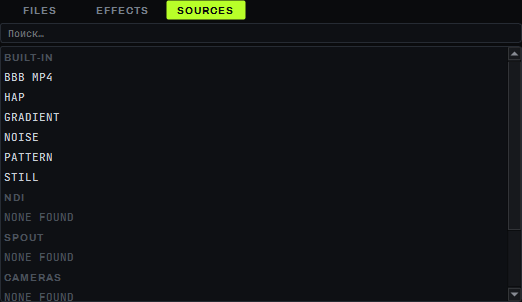
- Generators (BUILT-IN): gradient, noise, test pattern — procedural, no files.
Live sources
The SOURCES tab of the media browser shows four groups of live sources:
| Type | Capabilities |
|---|---|
| NDI 6 | receiving from any sender on the network (discovery and auto-connect), 8-bit RGBA/UYVY and 10-bit P216; HDR streams (PQ/HLG) are tone-mapped to SDR automatically |
| Spout | receiving and sending through shared D3D11 textures with no copies (Resolume, TouchDesigner, OBS and other Spout-compatible software) |
| Cameras and USB capture devices | via DirectShow (webcams, HDMI/SDI USB capture devices); no live testing with real cameras was done on the build machine |
| Streams (STREAMS) | receiving a network stream by rtmp://, rtmps://, rtmpt://, rtmpts:// or srt:// address; RTMP can also be received in server mode (LISTEN); video only, decoded on the CPU |
Each source row carries an AVAILABLE / CONNECTED / RECONNECTING / NOT FOUND status; double-clicking places the source on the active layer, dragging places it into a specific grid window. Up to 16 live sources at once.
The STREAMS group comes after CAMERAS; while it is empty it shows "NONE ADDED". To add a stream, click the
+ STREAM… row and, in the dialog, enter the stream address in the URL field (for example
rtmp://server/live/key) and, optionally, a name in NAME. A stream row shows the same statuses as NDI:
AVAILABLE / CONNECTED / RECONNECTING with a dot. A newly added stream stays AVAILABLE and does not connect until it
is placed on a layer (double-click the row or launch a window holding it); then the row turns CONNECTED, or
RECONNECTING if connecting fails, with the reason as the third line of the tooltip.
On a drop the program reconnects by itself with pauses of 1, 2, 4 and 8 seconds. On Windows a closed port is noticed
only after five to six seconds (the FFmpeg open timeout). Right-clicking a stream row opens a menu with EDIT…
(changes the address in place; layers, tracks and grid windows stay with the stream) and REMOVE (refuses while
the stream is on a layer, a track or a grid window). The stream is saved in the project along with the layers, even if
it is on no layer; loading a project without
it (or New Project) removes the stream.
SRT. An srt://host:port address in the URL field shows the SRT field group: MODE — caller (DL20 connects to
a listening source) or listener (DL20 waits and the source connects to it: while there is no source, the row on a layer shows
RECONNECTING with the tooltip "waiting for publisher"; each wait lasts 10 seconds, the next one starts half a second later);
LATENCY ms — buffer latency in milliseconds (120 by default); PASSPHRASE — the encryption password, at least 10
characters, the same on both sides; STREAM ID — the stream identifier, if the source requires one. The characters &, #,
? and space are allowed in the password and STREAM ID: they are encoded in the address. With a wrong password there is no
connection; the row tooltip shows a generic reason "…failed: I/O error" (it does not say that the password is wrong); the
password itself never reaches the tooltip or the log.
LISTEN: OBS publishes straight into DL20. The LISTEN (DL20 as server) checkbox (for an rtmp:// address only) turns
DL20 into an RTMP server: on an empty URL field it fills in rtmp://0.0.0.0:1935/live/dl. In OBS (Settings → Stream →
Custom) set the server to rtmp://<IP of the DL20 machine>:1935/live and the stream key to dl. DL20 does not check the
key or the application name: anyone who knows the address and port can publish onto the layer — on a shared network enter the
show-network interface IP instead of 0.0.0.0 and keep the port on a closed network. While OBS is not publishing, the stream
row (it has to be on a layer) shows RECONNECTING: DL20 waits for a publisher 10 seconds at a time and binds the port again half
a second after each wait, the tooltip reads "waiting for publisher" (during the first 10 seconds it is still empty); once
publishing starts it turns CONNECTED. In the row tooltip the address is written as rtmp+listen://…. A
second DL20 listener on the same port is refused: "port N is already used by another stream listener". The first time DL20
listens, Windows may ask for a firewall permission — allow dl_composition.exe on private networks.
Media browser
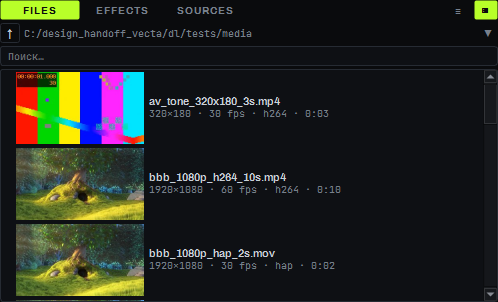
The FILES / EFFECTS / SOURCES tabs: a tree of all drives (the starting folder is the media root), file preview thumbnails, dragging into grid windows and onto the timeline, double-click to place a file on the active layer. A separate PREVIEW MONITOR lets you preview a clip before launch, without touching live layers. Up to 32 file sources in a project at once.
Limitations
- Animated GIF and APNG are not supported; the TIFF extension is accepted, but the decoder cannot read it — use PNG instead.
- Reverse playback (REVERSE, PING-PONG) works only for all-intra files (Hap, MJPEG, ProRes, DNxHR, H.264/HEVC with a key frame on every frame); a regular H.264/HEVC export with a long GOP always plays forward only.
- Blackmagic DeckLink and AJA (SDI capture) are not supported, nor are Syphon (macOS) and screen capture.
- A network stream has no audio: only video is received. DL20 only receives streams (SRT, RTMP, RTMP in LISTEN mode); it cannot send a stream out yet.
- An RTMP listener (LISTEN) does not check the publisher's key; a listener taken off its layer keeps the port until the stream is removed (REMOVE).